Technical Reference
SAML in CYO Integrations
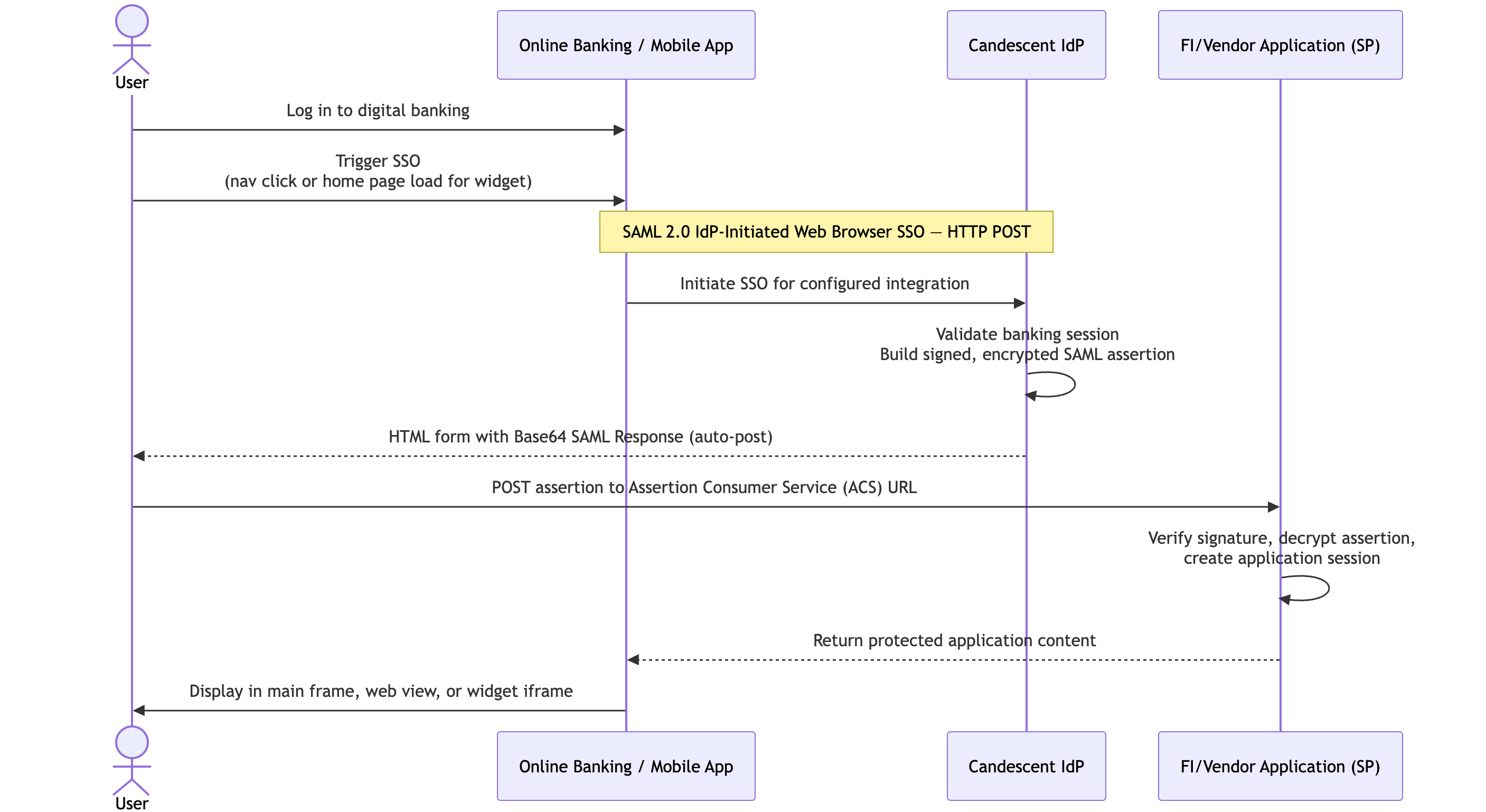
CYO integrations use SAML (Security Assertion Markup Language) to exchange authentication and authorization information between Candescent Digital Banking and the FI-hosted application.
| Role | Party |
|---|---|
| Identity Provider (IdP) | Candescent Digital Banking |
| Service Provider (SP) | FI or vendor application |
This enables users to access the FI-hosted application within their online or mobile banking session without logging in again. Candescent Digital Banking standardizes on the SAML 2.0 POST Profile. See the diagram below.
Assertion attributes, token formats, and federation gateway requirements are documented in the SAML Integration. This page covers only CYO-specific hosting and presentation concerns.
Header Customization
The CYO widget header consists of a translatable title and an icon.
| Property | Default | Override |
|---|---|---|
| Title | Derived from the widget name (converted to title case) | FI-specific title override |
| Icon | Generic article icon | Material UI (MUI) icon name in lower snake_case (for example, attach_money) |
If title or icon override properties are not exposed at the Global Widgets level, request Tech Support to add them.
Sizing and Responsiveness
CYO applications must be responsive across screen sizes.
Width
| Layout | Approximate width |
|---|---|
| Large screens (2-column layout) | Widget stack is ~4/12 of page width (roughly 350px – 465px) |
| Medium screens (1-column layout) | Stack expands up to ~1150px and scales down as the window narrows |
Height
The default CYO iframe height is 600px.
Dynamic Resizing
Include the iframeResizer scripts in your CYO HTML <head> so the widget adjusts height based on content — avoiding cut-off content or large white gaps.
<script src="https://resource.digitalinsight.com/leapfrog/lib/iframe-resizer/iframeResizer.contentWindow.min.js"></script>
<script src="https://resource.digitalinsight.com/leapfrog/lib/iframe-resizer/iframeResizer.min.js"></script>
Permissions
| Role / permission | Metadata editing | Source URL editing |
|---|---|---|
Candescent Admin (manage-global-widgets) | ✓ | ✓ |
FI Admin (FI_WIDGETS_EDIT) | ✓ | |
FI Admin (fi-widgets-read-only) | View only | View only |
FI Admins can update widget title and layout but cannot change the CYO source URL. URL changes require Candescent Admin access.
Troubleshooting
White Space Issues
If a CYO widget displays unexpected white space in Online or Mobile Banking:
- Verify
iframeResizer.contentWindow.min.jsandiframeResizer.min.jsare implemented in the CYO application. - Request that Candescent Support add the FI's domain to the integrated app domain list if resizing alone does not resolve the issue.
Cross-Origin Iframe Errors
A console error such as:
Uncaught Error: Unexpected message received from: https://[your-domain] for iFrameResizer0.
usually indicates the domain is not allowlisted. Contact Candescent Support to add the affected domain to the com.ncr.banking.usp.appconfig.integratedAppDomains configuration.
PDFs in Mobile Applications
PDF download and viewing behavior depends on the CYO application's configuration:
| Platform | Behavior |
|---|---|
| iOS | Generally handles PDFs seamlessly via the native WebView PDF viewer |
| Android | May require specific configuration within the CYO application; the platform does not control internal download behavior |
Next Steps
- Integration Surfaces — Layout options and placement constraints
- Getting Started — Widget creation and publication workflow
- SAML Integration FAQ — Common SAML integration questions