CYO SSO Integrations Overview
What Is a CYO Integration?
CYO (Create Your Own) integrations allow financial institutions (FIs) or their vendors to build and host custom web applications that are surfaced inside the Candescent Digital Banking platform.
In the CYO model:
- The FI or vendor handles application development and controls the look and feel of the hosted endpoint.
- The Candescent platform surfaces the application — either as an in-frame widget or by launching it in a separate browser window.
- The platform facilitates a secure Single Sign-On (SSO) connection using SAML.
CYO integrations are FI-hosted SAML SSO applications. The FI is treated as the service provider (vendor) for the integration. For general SAML concepts and assertion details, see the SAML Integration.
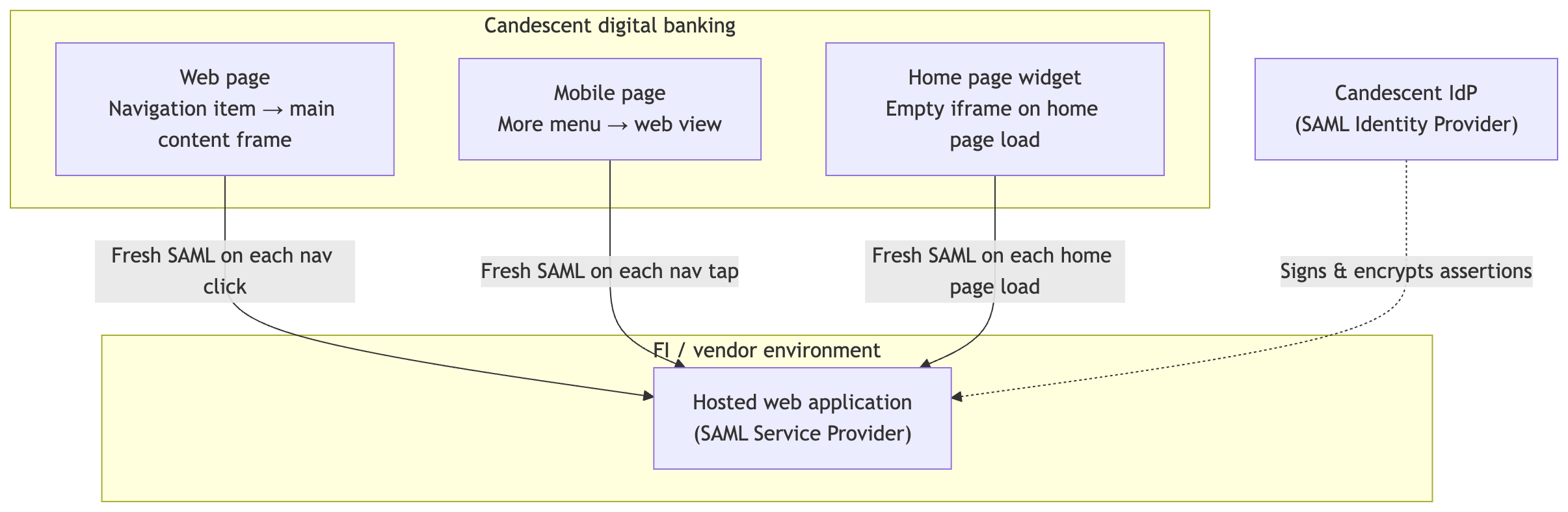
CYO widgets are iframe-based and configured through Experience Groups — not through the CDX Extensibility SDK or Extension APIs. See Integration Surfaces for where CYO applications appear in the platform.
Net New Integrations
When developing a new CYO application, the Fintech Integrations team must be notified of all connectivity and SAML attribute details before testing. This team works with support to install all SSO configurations.
Candescent encourages testing in stage environments. However, widgets can only be configured for test experiences in production.
See Getting Started for the configuration workflow once SSO is in place.
Next Steps
- Capabilities — What CYO integrations support on web and mobile
- Getting Started — Create and publish a CYO widget in Experience Groups
- Technical Reference — SAML context, sizing, iframe resizing, permissions, and troubleshooting
- Integration Surfaces — Where CYO applications appear in the platform